Moving an MLM company from one software platform to another is not a file copy. Your old system holds more than a list of members. It holds who sponsored whom, where each person sits in the tree, what everyone is owed, which rank they have earned and how much volume is still waiting to be used. If any of that arrives wrong, someone is paid wrong, and distributors notice a payout error faster than any other problem.
This guide walks through a migration in the order the work actually happens: take stock, map the data, reconcile the money, run both systems side by side, then cut over. It applies whether you are leaving a SaaS platform, an old licensed script or a system a former developer built and nobody fully understands any more.
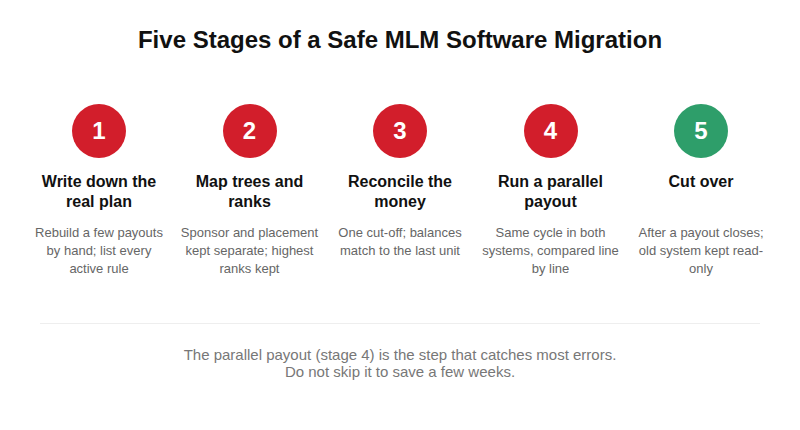
Quick answer: A safe migration has five stages: write down how the old system really pays today, map sponsor and placement trees and rank history into the new structure, reconcile every wallet balance and pending commission to a single cut-off, run at least one full payout cycle on both systems and compare the results line by line, then switch on a day when no payout run is open. The parallel payout comparison is the step that catches most errors, so do not skip it to save a few weeks.
Signs it is time to switch (and signs it is not)
Switching has a real cost in time and risk, so the reason should be specific. These are the situations that usually justify it:
- The plan has outgrown the software. You want a hybrid plan, a new bonus or a rank rule that the old system can only fake with manual spreadsheets each month.
- Payouts need manual fixes. Someone on your team corrects commissions by hand before every run. That is a sign the engine does not match the plan.
- You cannot get your own data out. Reports are limited, exports are partial, or changes depend on a vendor who answers slowly or has stopped answering.
- The cost structure no longer fits. A subscription that grows with every member can stop making sense at scale. See SaaS vs licensed MLM software for how to think about that.
- Security or compliance gaps. No audit trail, no role-based access, or records you cannot produce when a regulator or a distributor asks.
If the only complaint is that the screens look dated, a redesign of the member panel is usually a smaller and safer project than a full migration.
What actually has to move: a data inventory
Before you talk to any vendor, list every kind of data in the old system. This table is a starting point. Add anything specific to your business, such as product bundles, franchise or stockist records, or country-specific tax fields.
| Data | What to check | Common trap |
|---|---|---|
| Member records | Name, contact details, join date, status (active, inactive, blocked), country | Duplicate members created by past imports; the same person with two IDs |
| Sponsor tree | Who enrolled whom | Orphaned members whose sponsor was deleted |
| Placement tree | Left/right or position in a binary, matrix or board structure | Sponsor and placement treated as the same thing when they differ. See genealogy trees |
| Wallet balances | Available, pending, held and withdrawn amounts per member | Balances that do not equal the sum of past transactions |
| Commission history | Every bonus paid, by type and period | Only totals exported, so a disputed payout cannot be traced |
| Rank data | Current rank, highest rank achieved, date achieved, qualification history | Losing “highest rank ever” when the plan pays on it |
| Volume and carry-forward | Personal and group volume, unused leg volume carried to the next cycle | Carry-forward restarting at zero on cutover day |
| Orders and invoices | Orders, products, returns, invoice numbers, tax fields | Invoice numbering breaking or repeating after the move |
| KYC and documents | Identity and bank verification status, uploaded documents | Documents stored on a server you lose access to |
| Logins | Usernames, passwords, security settings | Password hashes that the new system cannot read |
Step 1: Write down how the old system really pays
Most companies have a plan document and a different reality. Over the years a manager approved an exception, a developer added a special rule for one leader, a cap was raised and nobody updated the document. If you build the new system from the document, it will pay differently from the old one, and distributors will see it in the first cycle.
Take one recent payout period and rebuild a handful of members' commissions by hand, from raw orders to final amount. Include a high earner, a new member, someone who crossed a rank and someone whose result you already know was corrected manually. Where the hand calculation and the old system disagree, find out why. The outcome is an as-built plan: the rules that are actually running, written in plain language with examples. Your new vendor needs this, and so do you, because the migration should be a decision to keep or change each rule rather than an accident.
Step 2: Map the trees and the rank history
Sponsor trees and placement trees are different structures, and many migrations go wrong when they are merged into one column during export. Your new system needs both, exactly as they were. Check three things after any test import:
- Every member except the company root has exactly one sponsor.
- In a binary or matrix structure, no position is occupied twice and no leg exceeds its allowed width.
- The member count at each level matches the old system's own report for the same date.
Rank history needs the same care. If your plan pays a bonus on the highest rank a member has ever reached, a system that stores only the current rank will quietly remove that right. Also decide how to treat members who were about to qualify at the moment of the move. Their progress toward the next rank is real volume, and it has to come across.
Step 3: Reconcile wallets and pending commissions to one cut-off
Money is where trust is won or lost. Pick a single cut-off moment, for example the close of a payout cycle, and make everything balance at that moment.
- For each member, available balance plus pending plus held should equal the sum of all credits minus all debits in the old system. Investigate every difference before importing.
- Decide what happens to commissions that were earned but not yet released, and to withdrawal requests that are in progress. They either finish in the old system or are re-created in the new one. Never both.
- Keep the old system's final export, locked and read-only, as your reference for disputes later.
- Check negative balances and balances with many decimal places. They are usually the sign of an old bug.
A simple rule helps: the total of all member wallet balances in the new system on day one must equal the total in the old system, to the last unit of currency.
Step 4: Passwords, logins and data permissions
Passwords are usually stored as one-way hashes. A new system can only reuse them if it supports the same hashing method, and it rarely does. Plan for members to set a new password the first time they log in, and tell them in advance so a reset email is not mistaken for phishing. Check that your reset and OTP messages are delivered before cutover, not after.
Also think about the personal data you are moving. If your members are in several countries, check what your privacy policy promised about where data is stored and who may process it, and whether a move to a new vendor or a new hosting location changes that. This is general information, not legal advice, so confirm with your own adviser.
Step 5: Run a parallel payout before you switch
This is the step that catches most mistakes. Import a copy of the data into the new system, then run the same commission cycle in both systems, with the same orders and the same dates, and compare the results member by member.
| Result | What it usually means | What to do |
|---|---|---|
| Totals match, members match | The engine follows the as-built plan | Repeat once with a different period, then plan the cutover |
| Small differences by a few cents or paise | Rounding order or currency precision differs | Decide on one rounding rule and set both systems to it |
| Differences clustered around a date | Time-zone or cut-off time differs | Align the cycle close time and re-run |
| Large differences for a few members | A special rule or exception is missing from the new system | Return to your as-built plan and add or retire the rule deliberately |
| Differences for everyone at a certain rank | Rank qualification or carry-forward logic differs | Check the rule with a worked example from the plan |
Run at least one full cycle this way. Two is better if your plan has weekly and monthly components. Keep a short written record of every difference and its cause. That record also helps you answer a distributor who later asks why a number changed.
Step 6: Choose the cutover day
Switch right after a payout cycle has closed and been paid, not in the middle of one. Tell members the date in advance, say what will be unavailable during the move, and keep that window short. Put the old system into read-only mode rather than deleting it, and keep it available for a defined period so you can check disputes.
Have a rollback plan written down before the day: what conditions would make you stop, who decides, and how you return to the old system without losing the orders placed in the meantime. Update everything that points at the old platform, such as your domain settings, payment gateway callbacks, email and notification templates, mobile app endpoints and any redirects from old URLs.
Migration checklist
- As-built plan written and agreed, with worked examples
- Data inventory complete and exports received from the current vendor or developer
- Sponsor and placement trees imported and counted against the old system's reports
- Rank history, highest ranks and carry-forward volume imported
- Wallet balances reconciled to one cut-off; pending and in-progress payouts decided
- Orders, invoice numbers and tax fields checked
- KYC status and documents moved and accessible
- Password reset and notification emails tested
- At least one full parallel payout compared line by line, differences documented
- Cutover day chosen outside an open payout cycle; rollback plan written
- Payment gateways, domain, mobile app and redirects updated
- Old system kept read-only for a defined period
What to ask the vendor before you sign
- What data can I export from my current system, in what format, and how long does an export request take? Check your current contract for exit and export terms before you announce a move.
- Who maps our data, and will we see sample imports before the real one?
- How is the parallel payout run and who signs off on the comparison?
- What happens if the numbers do not match on the first attempt? Is re-running included?
- How are passwords, KYC documents and logs handled, and where will the data be hosted?
- Who is available during and after cutover, and in which time zone?
These questions are useful for any vendor, including us. For a wider vendor checklist, see how to choose MLM software and how to hire an MLM software development company.
Common mistakes
- Migrating the plan document instead of the real behaviour. The old system's quirks are part of what members have been paid under.
- Importing the tree as a single parent column. That loses the difference between sponsor and placement.
- Skipping the parallel run because the first test looked fine on a small sample.
- Switching during a payout cycle and splitting one period's commissions across two systems.
- Leaving members uninformed. A password reset or a new login page without notice produces support tickets and distrust.
- Deleting the old system too early. Disputes appear weeks after a payout, and you will want the original records.
How we approach this
A move to a new platform is easier when the plan, the data and the checks are agreed before any code is written. If you are considering a switch, tell us what you run on today and how your plan pays, and we will say plainly whether a migration, a plan change or a smaller fix is the right next step. You can also look at the live demo to see the panels your members and admins would use.
Keep reading
- SaaS vs licensed MLM software — how you pay and who owns the code, before you move.
- Genealogy trees explained — sponsor versus placement, in detail.
- Cloud vs on-premise MLM software — where the new system should run.
See what we build on our custom MLM software page, or try the live demo.
Frequently Asked Questions
How long does an MLM software migration take?
It depends on the size of the data, the number of special rules in the plan and how clean the old data is. A small company with a standard plan can be much quicker than one with years of exceptions. The parallel payout cycle sets a minimum, because it needs at least one real period to complete.
Can I migrate if my old vendor will not give me the source code?
Often yes. What you need is your own data, not their code: members, trees, balances, history and orders. Check your contract and ask for a full database or complete export. If the vendor refuses, say so early, because it changes the timeline and the risk.
Will my distributors lose their downline or ranks?
They should not. Sponsor and placement trees, highest ranks and carry-forward volume all need to be imported and checked before cutover. If any of these cannot be moved exactly, you should know that, and tell your distributors, before the switch rather than after.
Should I change my compensation plan at the same time as migrating?
It is usually safer to move first with the plan unchanged, confirm the payouts match, and then change the plan as a separate step. Doing both at once makes it hard to tell whether a difference comes from the migration or from the new rule.
Do members need to reset their passwords?
In most cases yes, because the new system cannot read the old password hashes unless it uses the same method. Announce the change in advance and test the reset emails before cutover.