Most buyers of a smart contract platform test one thing before they pay: does it work? Members join, commissions are calculated, payouts go out. The question that decides who is really in charge usually comes later, often after launch: who is able to change it? A contract can run perfectly and still be controlled by a single wallet that belongs to the developer who deployed it. This guide explains the keys and roles behind a smart contract and what a client should hold on handover day. If you are still comparing ready-made options, start with the risks in smart contract MLM clone scripts.
This is general information, not legal or security advice, and the details differ by network and by how a contract is written. Always ask your vendor and an independent reviewer to check the real contract you are buying.
Quick answer: On handover day you should hold the source code and build files, the contract addresses with the source verified on the block explorer, a written map of every admin role and who holds it, and on-chain proof that control moved from the developer's deployer wallet to wallets you control, ideally a multisig with at least two signers. Upgrade, pause and fee-change powers should be limited, written down and tested on a test network first. If a wallet belonging to the vendor still holds any role after handover, you do not have full control.
What “owner” and “admin” mean in a contract
A smart contract is not a company with a login screen. Its powers are written into the code as functions that only certain addresses are allowed to call. Whoever controls those addresses controls those powers. The address that deploys the contract is often set as its first owner, which is why a careless deployment leaves the developer holding the keys without anyone deciding that it should be so.
These are the powers to look for. Not every contract has all of them, and some have none, which is a design choice in itself.
| Power | What the holder can do | Risk if one person holds it |
|---|---|---|
| Pause and unpause | Stop deposits, claims or payouts in an emergency | Can freeze the whole business or members' access |
| Change rates and limits | Set commission percentages, payout limits or fees | Can alter what members were told the plan pays |
| Upgrade the logic | Replace the code that runs behind the same contract address | Can change every rule, including who can withdraw |
| Treasury or withdrawal address | Move funds the contract holds to another address | Direct loss of funds if the key is stolen or misused |
| Mint or burn (tokens) | Create or destroy tokens | Can dilute holders or change supply without notice |
| Manage roles | Add or remove other admins | Can pass control to someone else quietly |
| Block or freeze an address | Stop a chosen address from using the contract | Can lock out members unfairly, or be abused |
When you review a contract, ask the vendor to list every function that only an admin can call, in plain words, next to the address that is allowed to call it. That list is the real map of who is in charge.
Three control setups you will meet
| Setup | How control works | Strength | Weakness |
|---|---|---|---|
| Single owner wallet | One address, often the deployer, holds the owner role | Simple and quick to set up | One lost or stolen key means lost control, and if the vendor deployed it, the vendor holds the key |
| Multisig owner | A wallet that needs several approvals (for example 2 of 3 signers) before an action runs | No single person can act alone; a lost key does not freeze everything | Needs a clear process and each signer's device to be kept secure |
| Multisig plus delay and separate roles | Sensitive actions such as upgrades wait in public for a set time before they run; pausing sits with a smaller group | Changes are visible before they take effect; fast emergency stop | More setup work and cost; slower for non-urgent changes |
Multisig wallets, delays and role-based access exist in different forms on different networks, so check what is available on the chain you plan to use. Our guide to Ethereum, Tron and BSC covers how to choose the network first.
Upgradeable or fixed: decide on purpose
A fixed contract cannot be changed after deployment. That is a strong promise to members, but a bug cannot be patched either. You would have to deploy a new contract and move everyone across. An upgradeable contract, usually built with a proxy pattern, lets you fix bugs and add features behind the same address. The cost is that whoever holds the upgrade power can change the rules.
Neither is right for every platform. What matters is that the choice is deliberate and written down. If the contract is upgradeable, you need answers to four questions: who can upgrade, does the upgrade wait for a delay before it runs, are members told in advance, and is each upgrade tested on a test network before it goes live.
The handover checklist: what you should receive
| Item | Why you need it | How to check it |
|---|---|---|
| Source code and build setup | So you or another team can rebuild and maintain it | Repository access moves to an account you own; the compiler version and settings are recorded |
| Contract addresses for each network | So you know exactly what is live | Every address opens on the block explorer |
| Verified source on the explorer | So anyone can read the code that actually runs | The explorer shows the source with a verified mark and it matches the repository |
| Admin role map | So you know who can do what | A document listing each role, the address that holds it and what it can do |
| Ownership transfer proof | So control really moved | Transaction hashes show the owner or role change; the explorer now shows your wallet and not the deployer |
| Multisig details | So no single person controls the contract | Signer list, approval threshold, and a test transaction signed by every signer |
| Deployment record | So the build can be reproduced and audited | Deployment date, settings used, scripts and transaction hashes |
| Tests and audit report | So you can see what was checked and what was fixed | Test results, an independent audit report and a list of issues with their status |
| Runbooks | So your team can act on a bad day | Written steps to pause, to upgrade, to replace a signer and who to contact |
| Supporting services | So the platform keeps running | Accounts for node access, indexers, automation jobs and hosting are in your name |
| Recovery plan | So one lost device is not a crisis | Backups of signer access held in separate places, with no seed phrases sent by email or chat |
An audit is valuable, but it is a review of a specific version of the code at a specific time. It does not remove the need for the controls above, and any change after the audit needs its own review.
Key custody: do and avoid
- Do use hardware wallets for signers, and keep signers with different people in different places.
- Do send a small test transaction from every signer before moving real control to the multisig.
- Do keep a written list of current signers and review it whenever someone leaves the team.
- Do agree in writing who can pause in an emergency and how quickly they can act without gathering every signer.
- Avoid sharing a seed phrase over email, chat or screenshots, even with a trusted vendor.
- Avoid having one person hold every signer key, or keeping the only copy of a key on one phone.
- Avoid a “backup” key quietly kept by the vendor. If the vendor keeps a role, it should be named, limited and agreed in writing.
- Avoid giving up ownership entirely (renouncing it) until you are sure nothing will ever need to be changed or paused.
A worked example (made-up setup)
Imagine a payout contract built for a company called Example Co. These numbers and roles are invented only to show the idea of handover.
| Power | Before handover | After handover |
|---|---|---|
| Owner | Developer's deployer wallet | 3-signer multisig held by Example Co, approval needs 2 of 3 |
| Upgrade | Owner, immediately | Owner multisig, after a 24-hour public delay |
| Pause | Owner, immediately | A separate 2-signer operations multisig, so an emergency stop does not wait for all three owners |
| Fee and limit changes | Owner, immediately | Owner multisig, with the change announced to members first |
| Developer's wallet | Holds every role | Holds no role; only an agreed support contact |
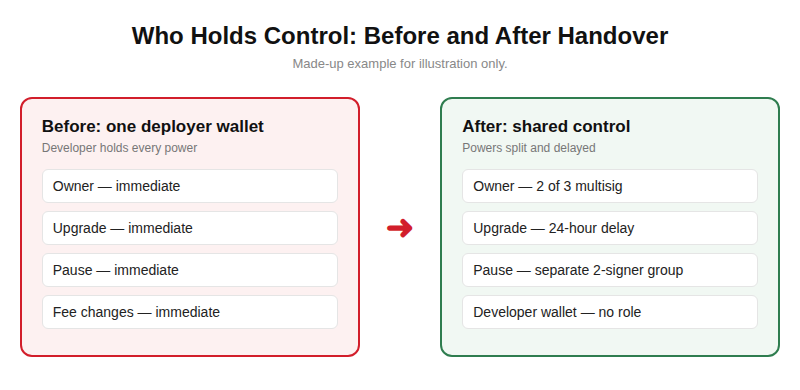
After the handover, Example Co can answer the question “who can change our contract?” with a list of names and rules, not “the developer, if they still have the key.”
How to test it before you accept
Do these on a test network first, with the vendor and your own technical reviewer present:
- Open the verified contract on the explorer and read its owner and roles. They should match the admin role map.
- Check the vendor's deployer address. It should hold no role after the transfer.
- Try an admin action from an ordinary wallet. It should be refused.
- Pause and unpause using the multisig, and confirm one signer alone cannot do it.
- If the contract is upgradeable, run a test upgrade through the multisig and see that the delay is visible before it takes effect.
- Replace one signer and confirm the approval threshold still works.
- Ask who can stop the contract quickly in an emergency, and test that path.
If the vendor cannot show these, you have found the gap before it costs you. Our MLM software security checklist covers the rest of the platform, such as roles inside the admin panel, approvals and logs.
Compliance: control and custody can overlap
If your admin keys can move or freeze members' funds, a lawyer or regulator may see that as holding funds on their behalf, which can bring extra duties in some places. Whether that applies to you depends on the country, the design and the plan. Please check the current rules with your lawyer before launch, and read our posts on custodial and non-custodial wallets and whether crypto MLM is legal. We build commission plans based on product sales and do not build deposit-return or investment-return schemes.
How we approach this
We treat ownership as part of what you are buying, not as an afterthought. At the design stage we agree with you which roles the contract needs, who holds each one and how an emergency stop would work. Before launch we walk through the checklist above on a test network. Whichever vendor you choose, ask them to commit to the handover items in your contract. If you would like to go through your own contract plan, talk to our team, or read about our smart contract development service.
Keep reading
- Smart contract MLM clone scripts — what you risk when you copy a ready-made contract.
- Custodial vs non-custodial wallets — who holds the keys for members' funds.
- MLM software security checklist — twelve checks to run in a demo.
See our crypto MLM software development and token development services.
Frequently Asked Questions
What is an admin key in a smart contract?
It is the private key of an address that the contract allows to call restricted functions, such as pausing, changing settings or upgrading the code. Whoever holds that key holds those powers, so the key matters as much as the code.
Should the developer keep any admin access after launch?
Ideally no. If you want the vendor to help with emergencies, give them one named, limited role, agree it in writing, and make sure it cannot upgrade the contract or move funds on its own.
What is a multisig and do I need one?
A multisig is a wallet that needs approval from several signers before an action runs, for example two out of three. Most platforms that hold real value should use one for the owner role, so that one lost or stolen key cannot decide everything.
Is an upgradeable contract safer than a fixed one?
Neither is automatically safer. A fixed contract cannot be changed, so a bug cannot be patched. An upgradeable one can be fixed, but the holder of the upgrade power can also change the rules. Decide on purpose, and if it is upgradeable add a delay and a multisig.
What happens if we lose the admin keys?
It depends on the design. If the only owner key is lost, admin functions such as pausing or upgrading may be impossible, even though the contract keeps running. That is why you need several signers, separate backups and a written recovery plan before launch.