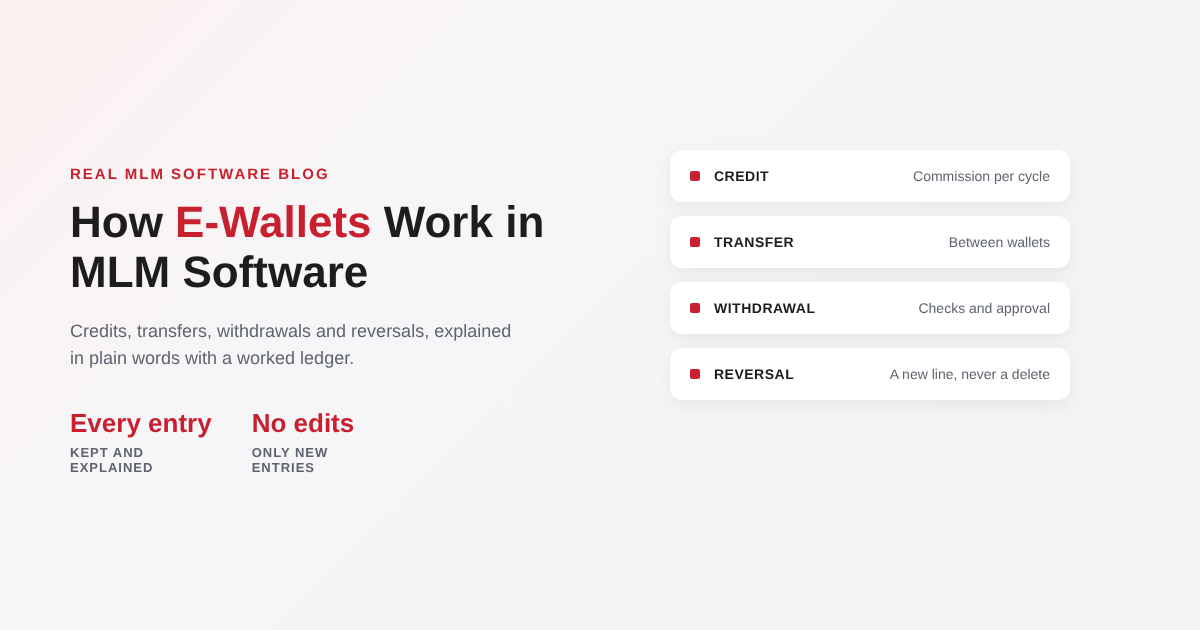
Every MLM business pays its members through some kind of wallet. Commissions land in it, members move money between parts of it, and withdrawals leave from it. When the wallet is right, nobody thinks about it. When it is wrong, it becomes the most expensive bug in the system, because it touches real money and every member can see it. This guide explains how an e-wallet in MLM software works, what each type of entry means, and what to check before you trust a vendor’s wallet with your payouts.
Quick answer: An MLM e-wallet is a ledger inside your MLM software that records every amount a member earns, moves or withdraws. Commissions are credited after each cycle, members can transfer or spend from it if your plan allows, and withdrawals go through checks and approval before money is paid to a bank account or other payout method. A good wallet never just stores a balance: it keeps every entry, so any balance can be explained line by line.
This post is about wallets that track money in your own currency inside your MLM software. If your platform pays in cryptocurrency, also read custodial vs non-custodial crypto wallets and crypto deposits and withdrawals.
What an MLM e-wallet actually is
It helps to separate two things that people often mix up. The wallet is a record in your software. The money sits in your company’s bank or payment gateway account. When a member sees a balance, they are seeing what the business owes them according to the ledger, not cash in a separate account in their name. Paying out means moving real money from your account to theirs, and the wallet records that it happened.
That is why the wallet must be built like an accounts ledger. Each entry has a date, a type, an amount, a reference to what caused it and who approved it. The balance is the sum of the entries. Nobody, including an admin, should be able to just type a new balance.
Wallet types you may need
Many businesses run more than one wallet per member, each with its own rules. Your plan decides which ones you need.
| Wallet | What goes in | What it can be used for |
|---|---|---|
| Commission wallet | Commissions and bonuses after each cycle | Withdrawal, transfer to other wallets, or orders if your plan allows |
| Repurchase (shopping) wallet | A share of earnings your plan sets aside, or transfers from the commission wallet | Orders in your online store only, not withdrawal |
| E-pin wallet | E-pins bought or received from another member | Placing orders with the e-pin; transfers if allowed |
| Holding balance | Amounts waiting for a condition, such as KYC approval or a return period ending | Released to the commission wallet when the condition is met |
Keep the number of wallets small. Each extra wallet is another set of rules for members to understand and for your accounts team to reconcile.
How money moves: the life of a wallet entry
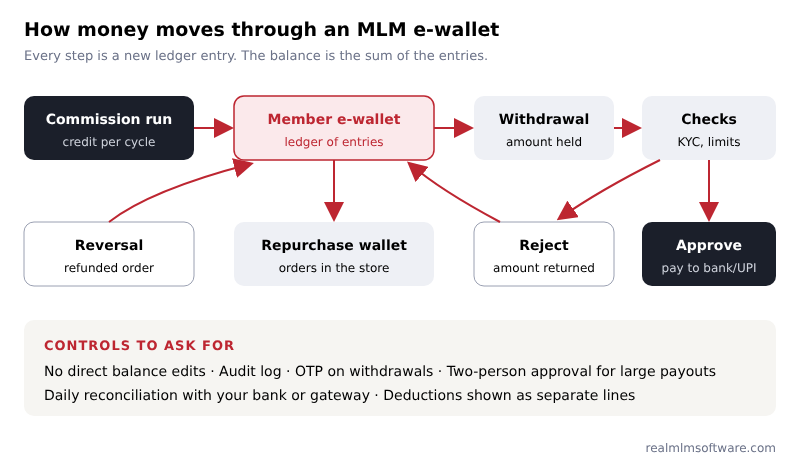
- Credit. After each commission run, the software credits each member’s earnings with a reference to the cycle, so the member can open the entry and see how it was calculated. Our post on carry-forward and flush-out shows the kind of calculation behind a credit.
- Transfer. If your plan allows it, members move amounts between their own wallets, or to another member. Transfers to other members should be limited and logged, because they are a common route for misuse.
- Withdrawal request. The member asks to be paid. The amount moves to “held” at once, so it cannot be spent twice while the request is checked.
- Checks. The software checks KYC status, the minimum withdrawal amount, bank or UPI details and any limits you set. Deductions your plan or tax rules require are applied and shown as their own line.
- Approval and payout. An authorised admin approves, and the payment is made through your bank, gateway or payout service. The entry is marked paid with the payment reference.
- Rejection or reversal. If a payout fails or a request is rejected, the held amount returns to the wallet as a separate entry. If an order is refunded after commission was paid, a reversal entry takes the commission back, again as its own line.
A worked example: one member’s ledger
Made-up figures to show the entries a wallet should keep. The 5% deduction is only an example; your plan and your accountant decide the real deductions. These are not earnings figures.
| Date | Entry | Credit | Debit | Balance |
|---|---|---|---|---|
| 1 Nov | Level commission, October cycle | 1200.00 | 1200.00 | |
| 1 Nov | Rank bonus, October | 300.00 | 1500.00 | |
| 3 Nov | Transfer to repurchase wallet | 250.00 | 1250.00 | |
| 5 Nov | Withdrawal request (held, pending approval) | 1000.00 | 250.00 | |
| 5 Nov | Deduction on withdrawal, as set by your plan (example: 5%) | 50.00 | 200.00 | |
| 6 Nov | Commission reversed: refunded order in October | 40.00 | 160.00 | |
| 8 Nov | Withdrawal rejected: bank details mismatch, amount returned | 1050.00 | 1210.00 |
Notice what the ledger does: the rejected withdrawal is not deleted, it is reversed with a new entry; the refund reversal is visible to the member with its reason; and the closing balance can be rebuilt from the lines above it. Ask a vendor to show you exactly this in their live demo, using your own example. Our demo checklist lists the wallet tests to run.
Withdrawal rules you will need to decide
| Rule | Typical choice | Why it matters |
|---|---|---|
| Minimum withdrawal | A fixed minimum amount | Avoids many small payouts that cost more to process than they are worth |
| Withdrawal days | Any day, or set days such as weekly | Set days make batch payouts and bank reconciliation easier |
| KYC before payout | Identity and bank details approved first | Protects you and the member; often required by banks and gateways |
| Deductions | Admin charges or tax deductions your plan or law requires | Must be shown as separate lines, never hidden in the amount |
| Approval | One approver, or two for large amounts | Two-person approval for large payouts reduces fraud and mistakes |
| Payout method | Bank transfer, UPI or a payout service | Decides which integrations the software needs (see payments, KYC and payouts in India) |
Security and control checks
- No direct balance editing. Admin corrections are entries with a reason and the admin’s name.
- A full audit log of who created, approved or rejected each entry.
- An OTP or similar confirmation for withdrawals and member-to-member transfers.
- Limits on transfers between members, and alerts on unusual patterns.
- Bank details changes locked for a short period before the next withdrawal.
- Daily reconciliation: total payouts in the wallet must match what left your bank or gateway.
Our security checklist covers the wider system. If you are moving from older software, migrate wallet balances as an opening entry with a reference to the old system, as our migration checklist explains.
Reports your accounts team will ask for
- Total credited per cycle, by commission type.
- Pending, approved, paid and rejected withdrawals, with payment references.
- Deductions collected, by type and period.
- Wallet balances owed to members at any date, which is a liability in your accounts.
- Reversals and corrections, with reasons.
How we build the e-wallet
Our MLM software includes a ledger-based e-wallet with the wallet types, withdrawal rules and approvals your plan needs, linked to your payment gateway and payout method, and visible to members in the web panel and the member app. You can see the member and admin side in the live demo. The wallet is one of the modules that affects the price, as our post on MLM software cost explains. If you want to check your own rules, tell us how your payouts work.
Frequently Asked Questions
What is an e-wallet in MLM software?
It is a ledger inside the software that records what each member earns, moves and withdraws. The balance is the total of those entries, and the real money stays in the company’s bank or gateway account until it is paid out.
Is the MLM e-wallet balance real money?
It is the amount the business owes the member according to its records. It becomes money in the member’s account when a withdrawal is approved and paid through your bank, gateway or payout service.
Why do some MLM plans use a repurchase wallet?
To set aside part of the earnings for product orders. Whether you use one, and how large a share, is a plan decision; the software keeps it separate so it can only be spent in the store.
How long should withdrawals take?
That depends on your approval steps and payout method. Many businesses pay on set days in batches, which makes checks and bank reconciliation easier. Tell members the schedule clearly.
What happens if a payout fails?
The held amount returns to the member’s wallet as a new entry with the reason, such as wrong bank details. Nothing is deleted, so the history stays complete.